By Asutosh Shah & Alpesh Shah · Founders, G-Tek Corporation · 30+ years in temperature…
Single Use Temperature Data Logger: Pull the Tab, Seal the Box, Done
By Asutosh Shah & Alpesh Shah · Founders, G-Tek Corporation · 30+ years in temperature monitoring, recording, and calibration instrumentation.
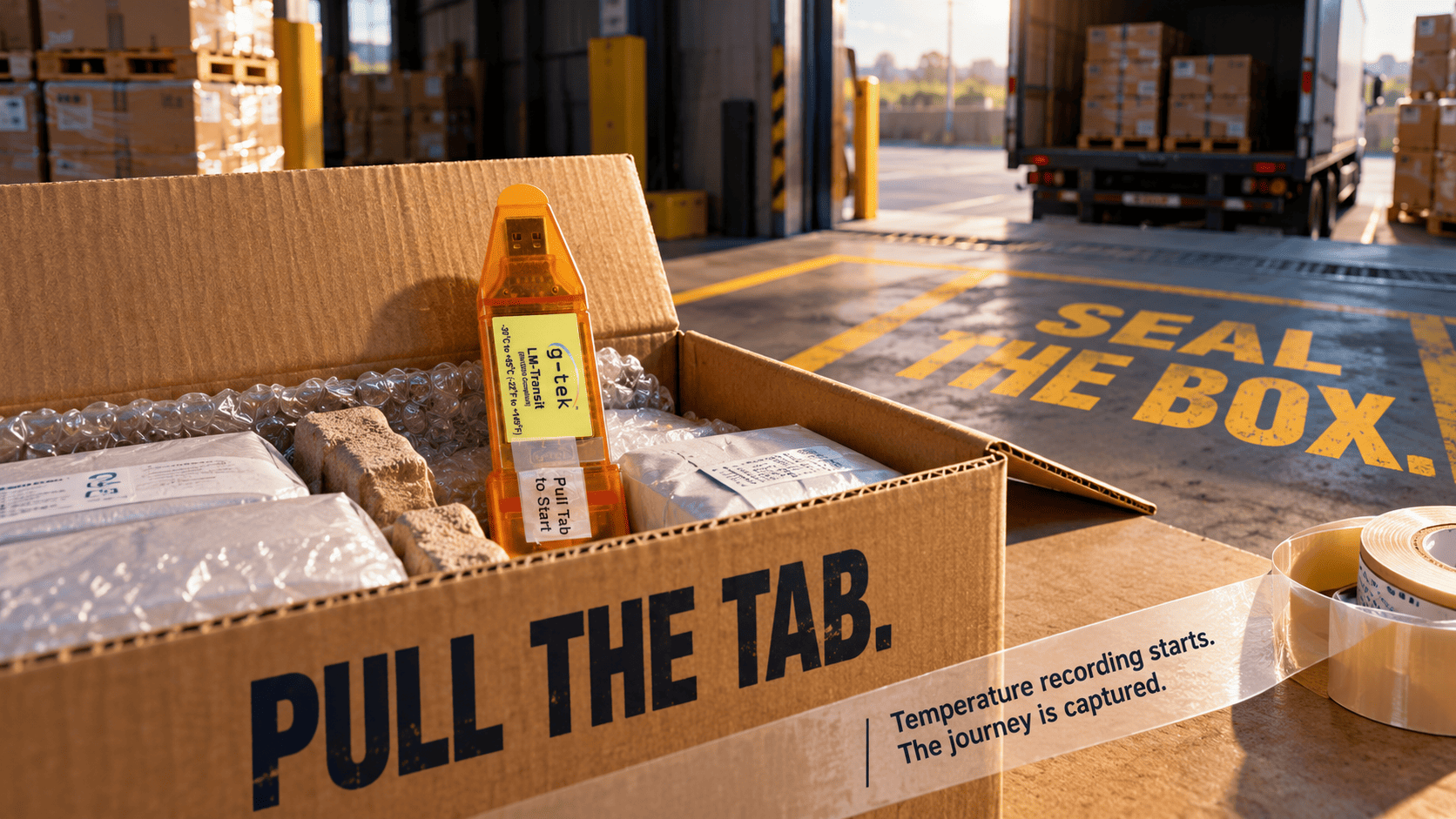
The truck is backed up to the dock. Pallets wrapped. Driver waiting.
Someone picks up a small white device, pulls a plastic tab, drops it in the box, and tapes the lid shut.
Four seconds. From that moment, the shipment is recording.
That is the entire operating procedure. No app. No programming. No training session.
A single use temperature data logger is a disposable device placed inside a shipment. It begins recording the moment its start tab is pulled and logs temperature across the whole journey.
At the destination, the data is read by plugging it into a computer, with no configuration required before use.
Key Takeaways
Recording starts the second the tab is pulled. No setup, no app, no training.
The device travels inside the box and logs the complete journey.
Data downloads over USB at the destination as a graph, table, and report.
Non-volatile memory holds the record long after the trip ends.
Removing the setup step is what makes shipment monitoring actually happen.
The Simplest Device Is the One That Actually Gets Used
A single-use shipment logger works because it removes the setup step entirely.
Pulling the start tab begins recording immediately, so anyone on the dock can deploy it in seconds.
Every step between “we should monitor this box” and “it’s recording” is a chance for it not to happen.
Programming a device. Setting an interval. Starting a batch.
Each one needs a person who isn’t already loading a truck. On a busy dock, that step quietly disappears, and the shipment travels unmonitored.
Factory calibration plus a pull-tab start removes all of them.
A red LED confirms the device is working. A blue LED confirms the batch is running.
That’s the whole interface.
The case for monitoring every outbound shipment rarely fails on intent. It fails on process.
Match the Device to the Journey, Not Just the Product
Check that the logger’s range and recording capacity cover your actual route.
LM Transit measures −30 to +60°C and holds 16,000 records. Therefore, the logging interval is fixed at the order stage to span the full trip.
A frozen consignment and an ambient pharma consignment don’t share a range.
Similarly, a two-day road leg and a three-week sea freight don’t share a capacity need.
The arithmetic is plain: interval × 16,000 must cover the journey because the batch stops once memory fills.
Build the specification around EN 12830, the European standard for recorders used in transporting temperature-sensitive goods, and against WHO GDP guidance in TRS 957 Annex 5.
Shipping practice for goods and medicines keeps coming back to the same point: the record only exists if the device was started.
G-Tek Corporation has manufactured monitoring instruments in Vadodara for over 30 years. It built LM Transit around that workflow.
The device is disposable and factory calibrated, with an internal 10K NTC thermistor. It reads −30 to +60°C at ±0.5°C sensor accuracy, suitable for transport monitoring rather than laboratory work.
Records sit in non-volatile flash rated for up to 100 years of retention.
The CR2032 cell runs beyond a year at a 15-minute interval. Meanwhile, the IP65 housing survives real handling, and construction follows IEC 61010-1 and EN 61326 Class A.
Calibration is backed by an in-house NABL ISO/IEC 17025-accredited laboratory.
For general cold chain applications, including food, logistics, and ambient pharma, LM Transit supports the monitoring workflow.
However, vaccine programmes under WHO-PQS need the LM Pro IN074 instead.
What Happens to the Data at the Other End?
The logger plugs into a computer over USB and downloads its full record in roughly five minutes.
LmView then presents the data as a graph, data table, and exportable report.
No gateway. No subscription step.
The receiving team sees the journey the way it actually happened, and the file stays with the consignment paperwork.
G-Tek software also displays current readings over USB while a batch is still running. This helps when a device is being checked mid-route.
Make Monitoring Something the Dock Can Actually Do
Shipment monitoring fails on the process, not the product.
A device that starts with a pulled tab removes the only step that ever gets skipped.
A single use temperature data logger makes shipment monitoring easier by removing setup requirements while maintaining a recorded temperature history.
Explore the full G-Tek data logger range before your next dispatch.
Shipping temperature-sensitive goods? Give the G-Tek team your route length and temperature range. Get a clear recommendation on the right single-use logger and logging interval.
Frequently Asked Questions
What Is a Single-Use Temperature Data Logger?
A disposable device placed inside a shipment that records the full journey. It starts on pulling a tab and needs no configuration.
How Do You Start a Single-Use Logger?
Pull the start tab. Recording begins immediately, and an LED confirms the batch is running.
No app, programming, or training is required.
What Range and Capacity Does LM Transit Have?
−30 to +60°C at ±0.5°C sensor accuracy, storing 16,000 records in non-volatile memory rated for up to 100 years.
How Is the Data Read at the Destination?
It plugs into a computer over USB and downloads in about five minutes. LmView then turns the data into a graph, table, and report.
Where Is G-Tek Corporation Located?
Vadodara, Gujarat — manufacturing monitoring instruments for over 30 years, with an in-house NABL ISO/IEC 17025 calibration laboratory.
Related Posts